I’ve been experimenting with Google's Gemini recently✨, and I want to share how I'm using it daily as a 3D Artist in the industry.
When people talk about AI in 3D, the focus is usually on generating images or meshes (which often yield mixed or low-quality results). While I have experimented with generative meshes (I'll save those thoughts for a future post! 🫡 ),
I’ve found that AI's true power isn't generating art🎨—it helps me create tool to accelerate my workflow🚀.
I have always wanted to learn Python🐍. I knew it was an essential skill to have as a 3D Artist, but honestly... my brain just isn't wired for coding. ☠️☠️Aside from print("Hello World"), it never really stuck.
I had a ton of ideas for custom scripts but lacked the ability to build them. I used to rely on buying generic paid tools made by other artists, but they never perfectly matched my specific needs or my habits.
Now, as a Senior 3D Artist, I use AI as my personal Technical Artist (TA) 🤖assistant to build exactly what I need. Here is how I’m currently using it to level up my efficiency:
🛠️ 1. Automating Repetitive Work
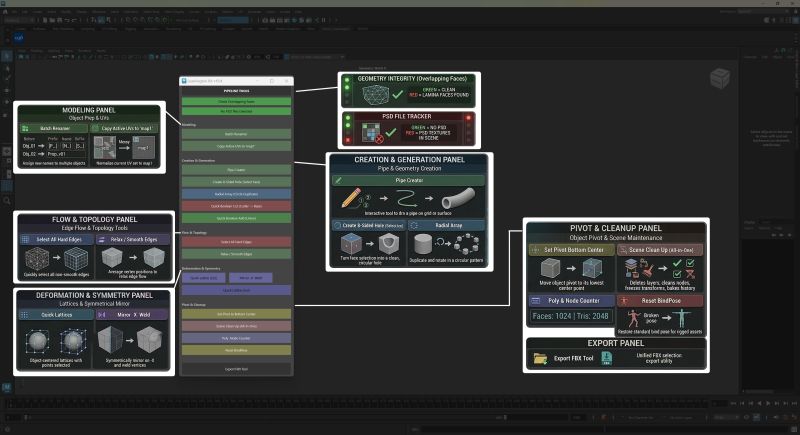
As I work, I pay close attention to the manual, tedious tasks I hate doing. Then, I use AI to write Python scripts that turn those steps into a single button click. For example, I recently built custom tool that has functions like "Pipe Creator," "Surface Hole Puncher," and "Scene Cleaner" tools to instantly speed up my modeling process in Maya.
🌐 2. Creating Standalone Web Tools
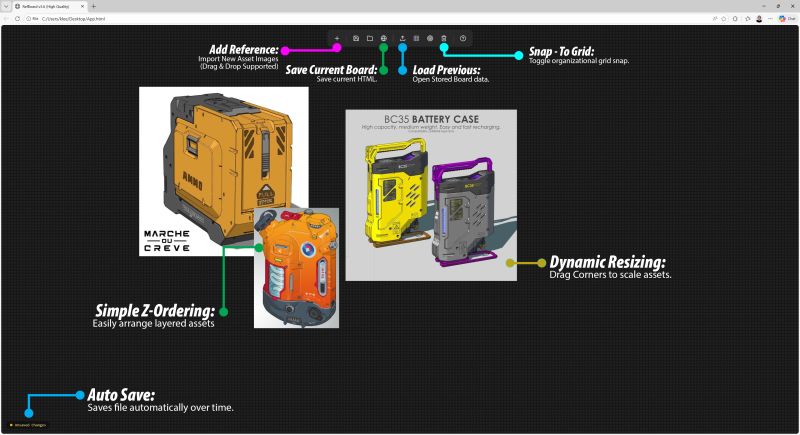
Sometimes I need a specific software but face program restrictions or don't want to buy a whole new app. Instead, I use AI to generate lightweight HTML/Python tools that run right in my browser. No downloads, no subscriptions—just standalone tools outside of Maya that serve my exact needs.
💡 3. Instant Technical Support
When I hit a technical roadblock or a software error, I no longer rely on endless Google searches. I go straight to AI. It doesn't just solve the immediate bug; it often suggests alternative methods I hadn't even considered before.
I’ve attached some images of the custom tools I've built so you can see what they do!
Thanks for reading, and I highly encourage other artists to try using AI to build tools that fit their own workflows. :)
#3DArt #GameDev #TechnicalArt #WorkflowOptimization #Python